Open SNGPL domestic application tracking → Keep your original acknowledgement beside you. The status search and any personal details stay on SNGPL's official service.
Public forms and sources checked 2 October 2026. We did not query a private application. SNGPL's response and issued documents determine your case's actual stage.
Application reference, CNIC and consumer number are different
| Identifier | Where to find it | What it identifies |
|---|---|---|
| Application reference | Submitted application or acknowledgement | The application you want to follow. |
| Account ID on application paperwork | SNGPL's letter or issued case document | The case/account record used by the relevant service. |
| CNIC | Your identity document | The applicant; enter it only when the selected official service requests it. |
| Bill consumer number | An issued SNGPL gas bill | The billing account; it is not automatically the application reference. |
Take the reference from your own saved document and keep all its digits. Do not substitute a neighbour's consumer number from the original application, a receipt transaction ID or an electricity reference.
Use the official tracking form that matches your application
- For an online domestic application Open SNGPL's domestic RLNG application page. Its status section requests the application reference number and CAPTCHA.
- For another application route Open the general SNGPL application tracker, select the application type, and use the requested reference/account identifier. If that selected service requests CNIC, enter your own CNIC there.
- Complete the visible challenge Enter the CAPTCHA displayed on SNGPL. A refreshed challenge needs its new characters; this website cannot complete it.
- Save the result privately Record the exact status wording, date, case reference and any action requested. Keep a screenshot or printed copy if it helps your follow-up.
These forms were inspected on 2 October 2026 without submitting a customer search. The general tracker's identifier prompt depends on the selected route; CNIC-only search is not promised for every case.
A reference or paid demand notice is not a working gas supply
Use the checkpoints below to understand your paperwork. They are reading aids, not a list of status codes that every SNGPL screen must display.
| Record you have | What to check next |
|---|---|
| Provisional reference | SNGPL's reference-page notice says particulars still need scrutiny; keep the later acknowledgement separately. |
| Acknowledgement | Check whether SNGPL asks for missing papers or a premises survey. |
| Proposal/demand notice | Check case details, charge components and any houseline/contract prerequisites. |
| Payment receipt | Keep proof and ask whether it has been recorded against this case; it does not prove commissioning. |
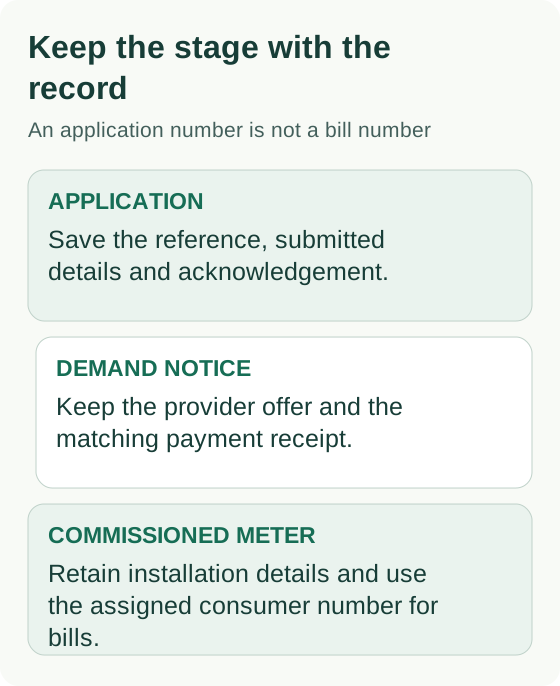
| Installed/commissioned connection | Keep the meter/commissioning record and obtain the correct consumer details for billing. |
No result, missing receipt or no visible progress?
| Problem | A useful check |
|---|---|
| Reference not recognised | Recheck the selected application route and every digit against the original document. |
| CAPTCHA rejected | Follow the current challenge on the official form; do not repeatedly reuse an expired image. |
| Payment not reflected | Prepare the issued notice and dated receipt/transaction reference for reconciliation. |
| Next action unclear | Ask which document, survey or other prerequisite remains outstanding. |
An unavailable form or empty result does not prove rejection, approval or a particular waiting-list position. Use SNGPL's current customer-care office directory for the responsible regional office. Ask for the next case action and retain its response; this guide does not estimate a backlog.
Build a small case history you can actually use
| Keep privately | Why it helps |
|---|---|
| Original reference and acknowledgement | Prevents mixing provisional receipt and the later case record. |
| Status wording and date checked | Makes a later change visible without relying on memory. |
| Notice number, charge lines and due instructions | Connects a payment query to the correct issued document. |
| Payment amount, date and receipt reference | Supports a request to reconcile that payment. |
| Office response and requested document | Shows what has been supplied and what remains to do. |
For example, write: “My case reference is [reference]. I paid notice [notice] on [date] and have its receipt. Please confirm whether this payment is recorded and identify the outstanding prerequisite.” Use the completed note only with SNGPL. Mask CNIC, address and account details before sharing a screenshot publicly.
An old paid system-gas application has a separate RLNG route
SNGPL provides a consent form for already-paid demand-notice/urgent-fee cases. It asks for the case consumer number, CNIC, CAPTCHA and acceptance of the RLNG contract and affidavit. Read those documents before agreeing; conversion consent is a distinct request from a new online application.
The checked FAQ gives a Rs. 15,500 security difference where Rs. 4,500 was previously deposited, bringing security to Rs. 20,000. This example is not a universal balance for every old application. Ask SNGPL to reconcile the original payment and issue the applicable difference notice for your case.
Move from application tracking to your first gas bill
After commissioning, use the billing consumer details supplied by SNGPL. The consumer-bill guide opens the official bill lookup; an application reference alone is not a payable gas bill.
The domestic RLNG contract tells a consumer to contact SNGPL if the first bill has not arrived within 90 days of commissioning. That is a missing-bill contact threshold, not a promised meter-installation time. Keep the commissioning date and ask for the issued bill and payment liability rather than assuming no amount is owed.
Questions you may have
Can I check every application by CNIC?
No universal CNIC-only method was established. Online domestic tracking asks for the application reference. In the general tracker, select the type and follow the identifier requested by that service.
Does paying the demand notice guarantee installation in 30 days?
No fixed 30-day completion promise is established here. Payment, feasibility and completed prerequisites are separate parts of the process. Ask SNGPL for the next action on your individual case.
Can this website retrieve my status or submit a case?
No. Open SNGPL's official service yourself. We do not receive your application number, CNIC, documents, CAPTCHA or payment.
Sources & scope
The sources below explain the service or rule discussed on this page. Use your provider’s records for an individual account.
- SNGPL: online domestic RLNG reference trackingPublic reference-number and CAPTCHA fields checked 2 October 2026; no customer lookup submitted.
- SNGPL: general application status formApplication-type and identifier fields inspected. Footer: Last Update - 25/09/2026; follow the selected service's prompt.
- SNGPL: provisional application-reference noticePublic empty template explains scrutiny before acknowledgement. It is not a tested private application result.
- SNGPL: already-paid RLNG conversion consentPublic form and linked consent documents checked 2 October 2026. Footer: Last Update - 21/09/2026.
- SNGPL: RLNG domestic connection FAQEarlier security-deposit difference is conditional on the old amount paid; use the issued case demand.
- SNGPL: domestic RLNG contractClause 13 includes the contact threshold when a first bill is missing after commissioning.
- SNGPL: official customer-care office directoryUse the current regional contact published by the provider; no personal case was discussed.